Search-and-find picture activities, graded.
Upload any picture and draw a region around each thing to find. Mark the near-misses you expect children to tap. Students search the picture itself, and you see what they found and every wrong tap.
A picture becomes a question in three steps.
Choose a picture
Upload a photo or a drawing, or pick one from your media library: a playground, a pond, a town map, a page of shapes.
Draw the regions
Drag a rectangle or an oval over each thing to find, or trace an odd shape point by point. Switch the tempting wrong answers to Not this one.
Choose how it checks
Right away marks every tap as it happens. At Done lets students circle freely and checks the whole set when they tap Done.
What you see in the studio, and what students see.
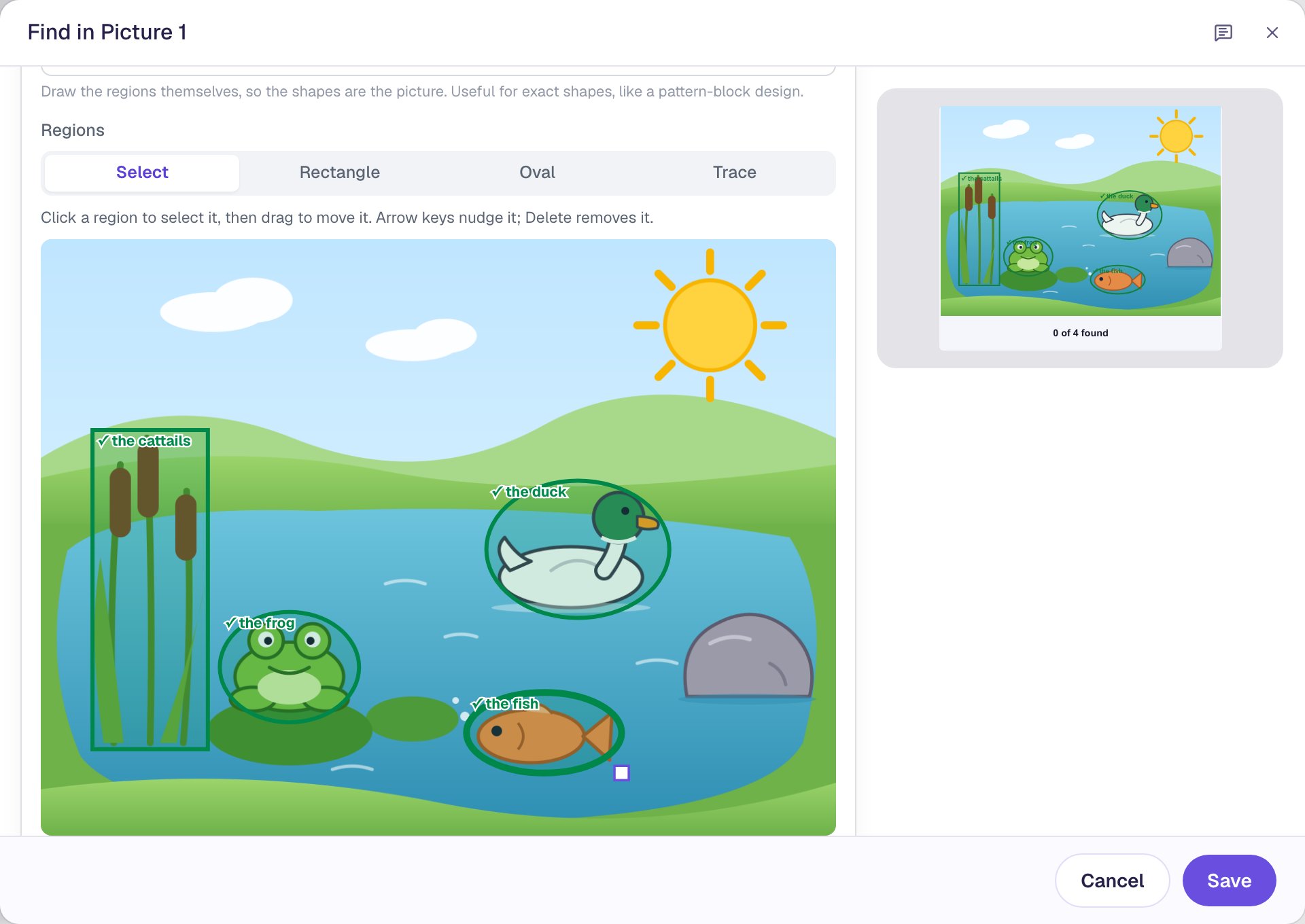
Draw a region around each thing to find, and name it. 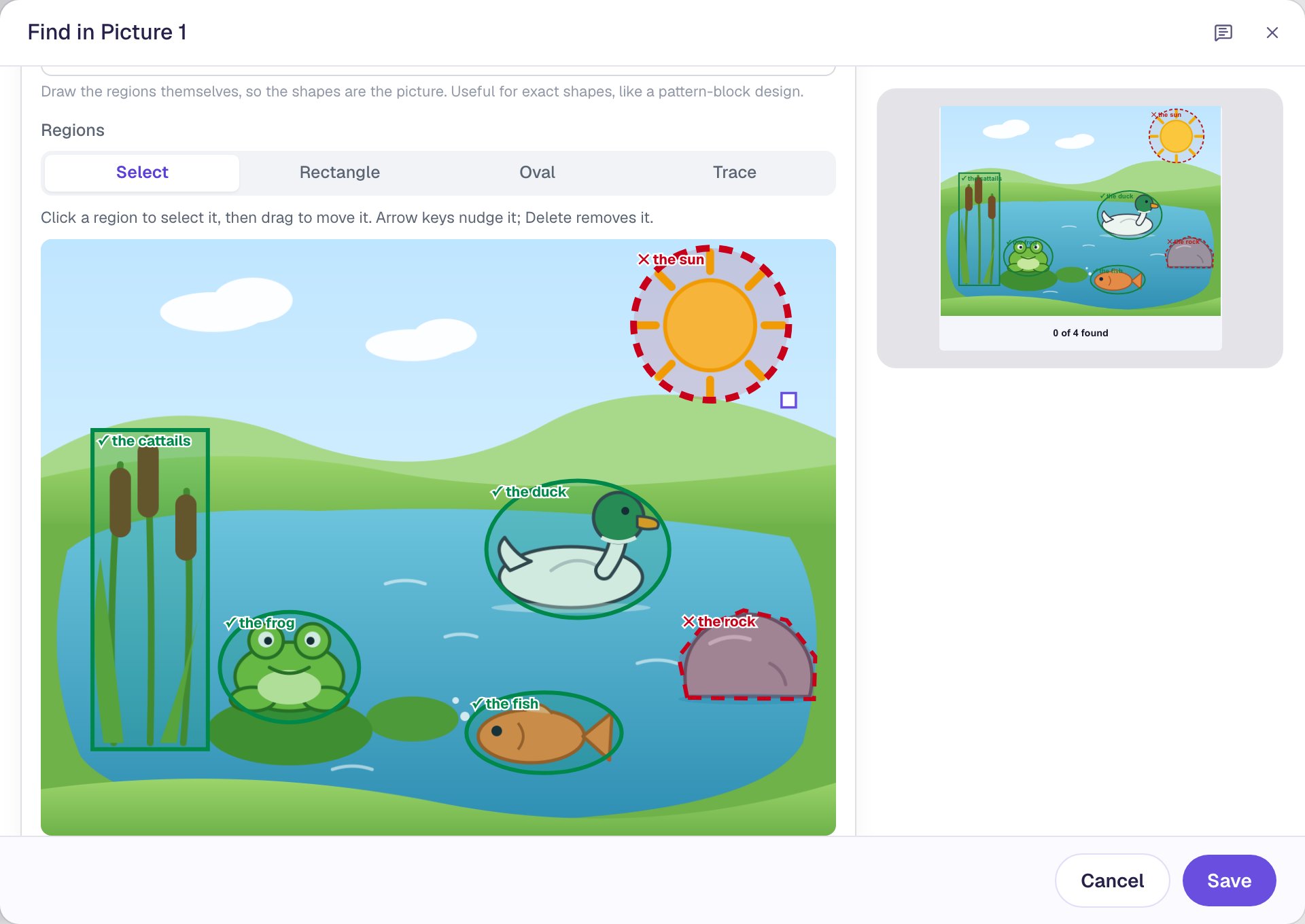
Near-misses are red and dashed. Here, the sun and a rock. 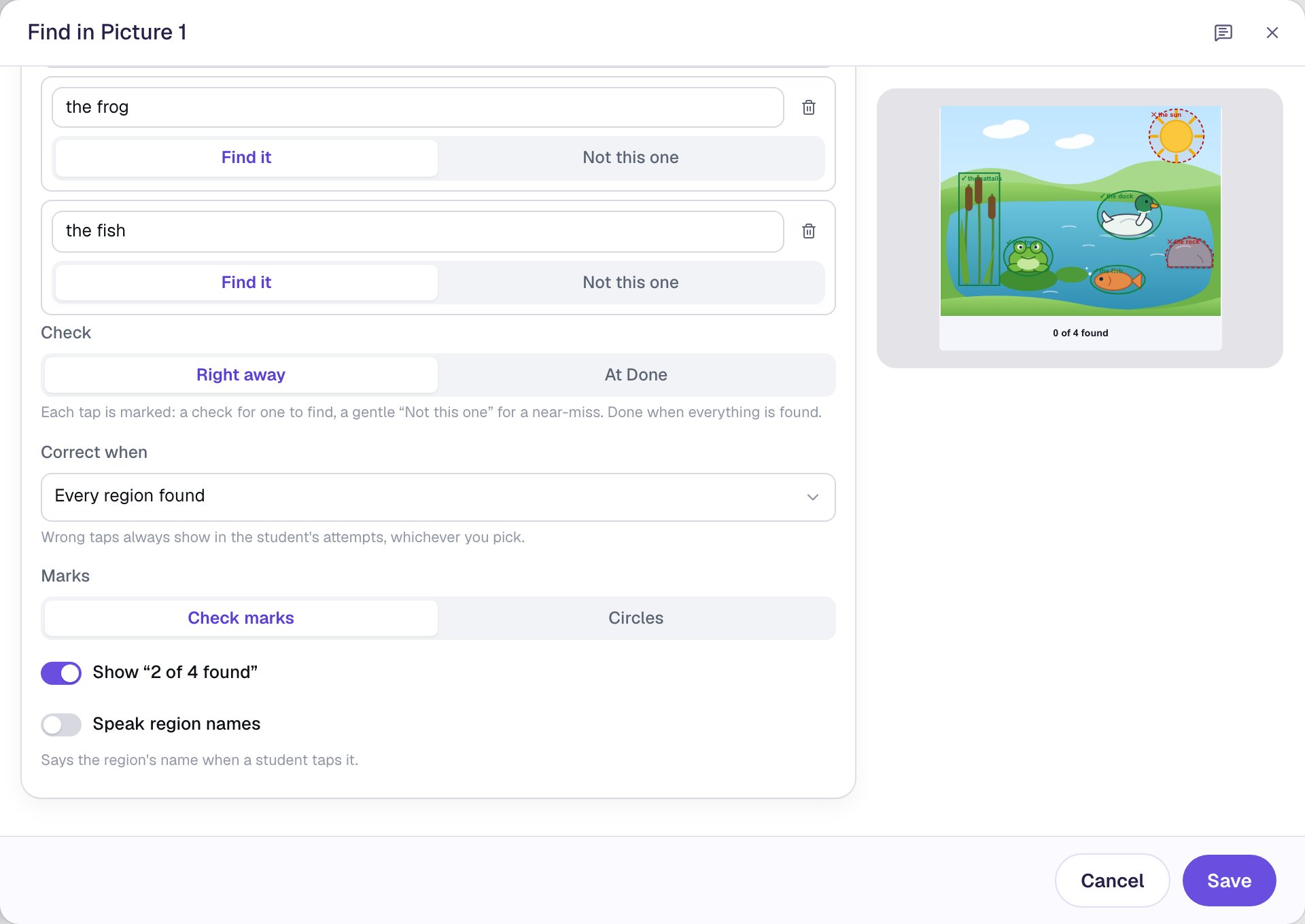
A few settings decide how it checks and what students see. 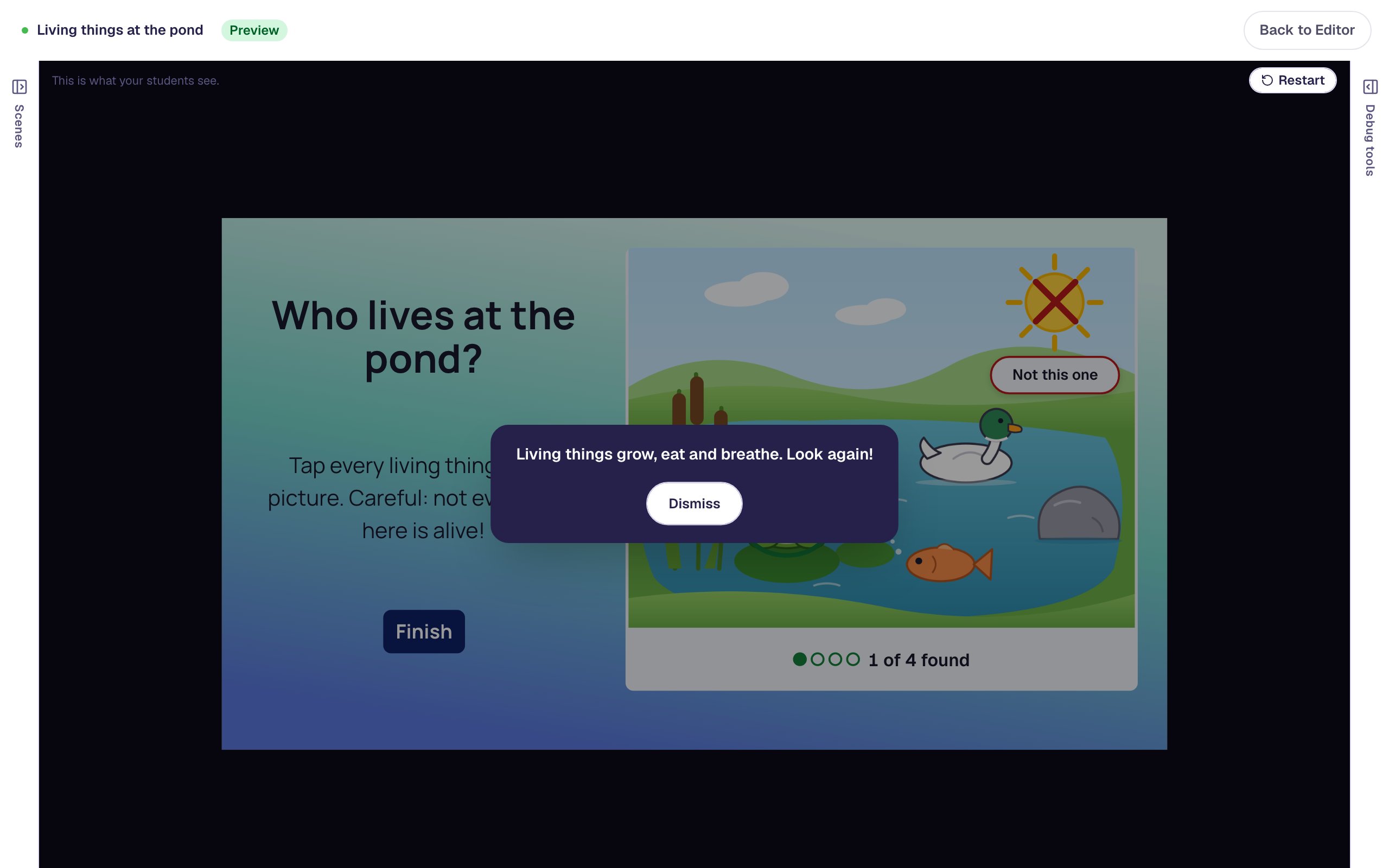
A wrong tap gets a cross, “Not this one” and, if you add one, your hint.
One widget, every subject.
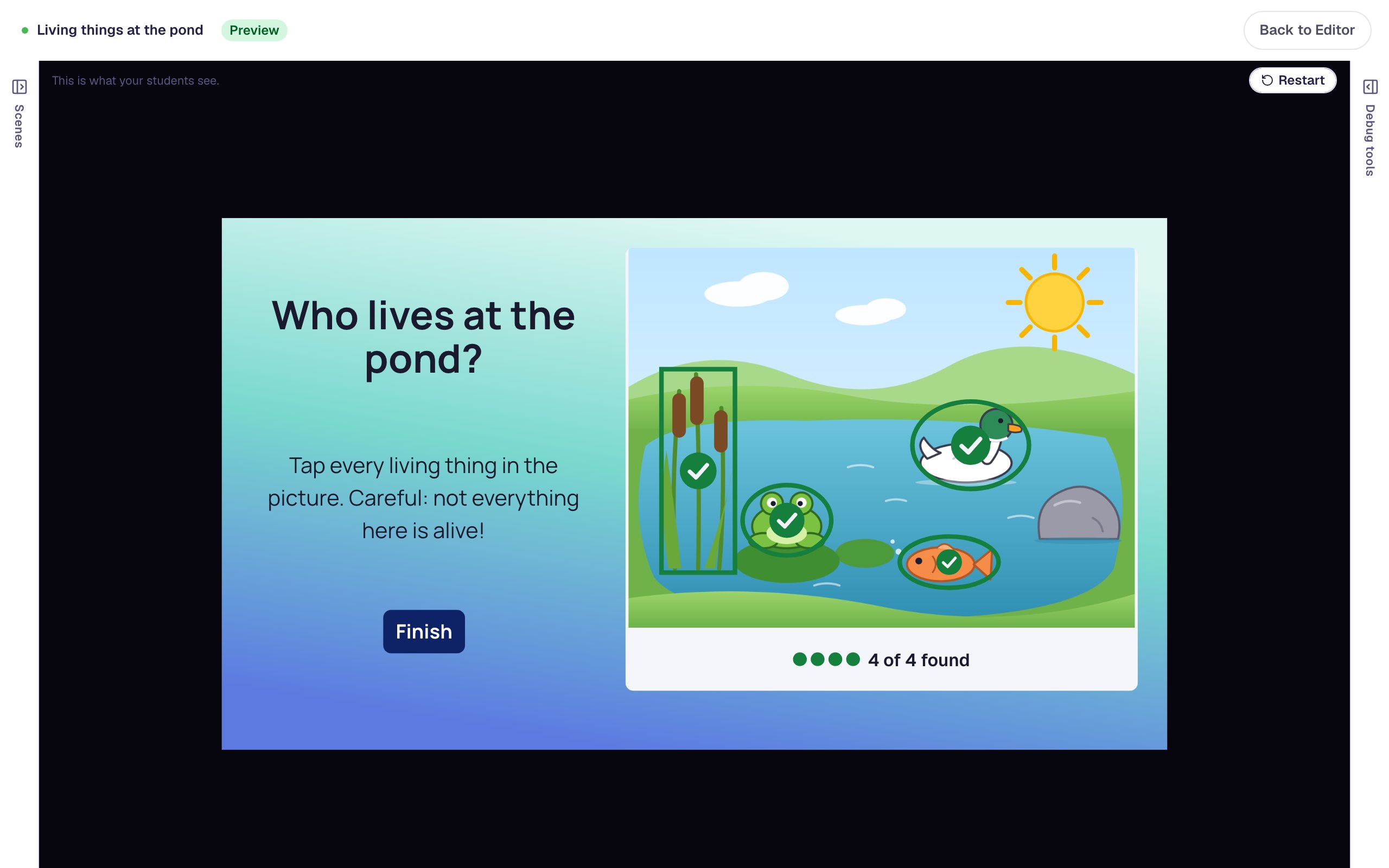
Any question that starts with “find every…” fits. These four play the way students see them; each one is a picture and a few regions.
“Tap every rectangle”: a playground picture with green rings around the shed door, the window, the sandbox and the bench, and “4 of 4 found”. The triangle sign and the ball are not marked. Math · Kindergarten
Shapes in the world
Finding shapes around them is where kindergarten geometry starts. The door, the window, the sandbox and the bench are rectangles; the triangle sign and the ball are near-misses. Marks set to Circles draws a ring like a pencil would.
Rectangles get a ring; the triangle sign is a near-miss.
“Tap everything that starts with b”: a picture with a ball, a bus, a bee and a banana each checked in green, and “4 of 4 found”. The donut and the pear are not marked. Phonics · K–1
Beginning sounds
Ask for everything that starts with b, and make the donut a near-miss to catch the b and d mix-up. Turn on Speak region names and the device says each name as it is tapped, so children who can't read yet hear the word.
The donut catches the b and d mix-up.
“Who keeps our town safe?”: a town map with the fire station, the police station and the hospital checked in green, and “3 of 3 found”. The library and the bakery are not marked. Social studies · Grades 1–2
Places in a community
On a town map, students tap the fire station, the police station and the hospital. The bakery is a near-miss. The library has no region at all, so tapping it counts for nothing.
A tap on the bakery says “Not this one”.
“Which shapes show halves?”: six shapes, with green rings around the four cut into equal halves (a square, a circle, a triangle and a rectangle cut corner to corner) and a Done button. The rectangle and the circle cut into unequal parts are not circled. Math · Grade 3
Equal parts, checked at the end
With Check set to At Done, students circle shapes with no hints and Done checks the whole set. A wrong set says “Not yet. Look again.” and they can change their circles.
At Done: circle freely, then Done checks the set.
More pictures to search.
Science
“Tap every animal hiding in the forest picture.”
Geography
“Tap every country that touches the Pacific Ocean.”
Health and safety
“Tap every danger in this kitchen.”
Art
“Tap every warm color in the painting.”
English learners
“Tap everything you would pack for the beach.”
Speech therapy
“Tap every picture with the /r/ sound, then say it.”
Reading
“Tap what Fox carried home in the story.”
Music
“Tap every brass instrument in the orchestra.”
Three ways to use it in class.
Practice with feedback
Right away gives a check for each find and a gentle “Not this one” for a near-miss. A row of dots shows how many are left.
An end-of-unit check
Set Correct when to Every region found with no wrong taps, or use At Done, so students mark what they believe before anything is checked.
Show me, then you try
Put Reveal the answers on a “Show me” button to mark every region for a demonstration, then let students try a new picture on the next scene.
The settings that shape the question.
Find it or Not this one
Every region is one to find or a near-miss. Taps anywhere else count for nothing, so a child who taps the sky isn't marked wrong.
Right away or At Done
Mark each tap as it happens, or let students circle freely and check the whole set when they tap Done.
How strict to be
Correct when every region is found, or only when every region is found with no wrong taps. Either way, wrong taps show on the attempt page.
Marks and the counter
Check marks or circles on what was found, and an optional “2 of 4 found” with a row of dots.
Speak region names
The device's own voice says each region's name as it is tapped, for children who can't read yet.
Hints and next steps
Add a behavior on Found, Wrong Tap or All Found: show a hint after a wrong tap, or move on when everything is found.
Every setting is explained in the help center: Find in Picture widget.
Build one with us, a screenshot for every step.
Common questions
Turn your first picture into a question today.
Build and preview for free, with no credit card. When you assign it, students play in the browser on a Chromebook, tablet or phone.